Open

Improved Text Rendering

  • July 31, 2025
  • 2 replies
  • 66 views

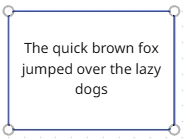
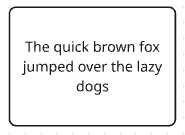
Using Miro on a Windows 10 or 11 machine in browser or using the app produces a low resolution experience. When text is active it looks like (pending your screen resolution) but when you click away from the text it blurs. I’ve raised this before and despite initial denial it was agreed it could be better.

Refer to https://community.miro.com/ask-the-community-45/everything-on-my-whiteboard-is-blurred-16739?tid=16739&fid=45

In my opinion it should be much better. I don’t like miro for this one reason. It is hard to use a tool when it is blurry all the time (no it’s not my computer or settings).

To improve my experience I now use Miro on Safari on my Macbook. This is not a great solution.

2 replies

Eca
Mironeer
Forum|alt.badge.img+2
  • Mironeer
  • August 1, 2025

HI ​@Marcus Roth thanks for reaching out! 


Our team will review this and it’s open for votes and comments. For those coming across this idea, if you feel this would be helpful for you or your business, please be sure to vote for it and leave a comment about your use case to help our team scope this request!


Thank you again for helping make Miro better!


  • New Here
  • November 12, 2025

I’ve had this same problem for months, it’s distracting enough that I just can’t even use Miro anymore.  It happens in both Chrome and Edge.  Here is what text looks like when active:

Here’s what it looks like when not active:

There was another thread on this from a few years ago - https://community.miro.com/ask-the-community-45/why-text-is-more-clear-in-editing-but-blurry-afterwards-4731.  Someone recommended turning off graphics acceleration, but that’s not a real solution because it impacts performance on other sites.